> ## Documentation Index
> Fetch the complete documentation index at: https://docs.niobi.co/llms.txt
> Use this file to discover all available pages before exploring further.
# IP Whitelisting
To securely access our APIs, your server’s public IP addresses must be whitelisted for both **Sandbox** and **Live** environments.
Whitelisting ensures only trusted systems can access our APIs and receive sensitive information like transaction or webhook data.
***
## Portal IP Whitelisting (Guide)
To manage IP whitelisting directly in the portal, follow these steps:
1. Log in to your Niobi dashboard.
2. Navigate to **Workspace**.
3. Select **IP Whitelisting**.
4. Click **Add New** to add a new IP address
5. Fill in the IP address details and save.
6. To change an entry, click **Edit**, make your updates, and save.
7. To remove an entry, click **Delete** and confirm.
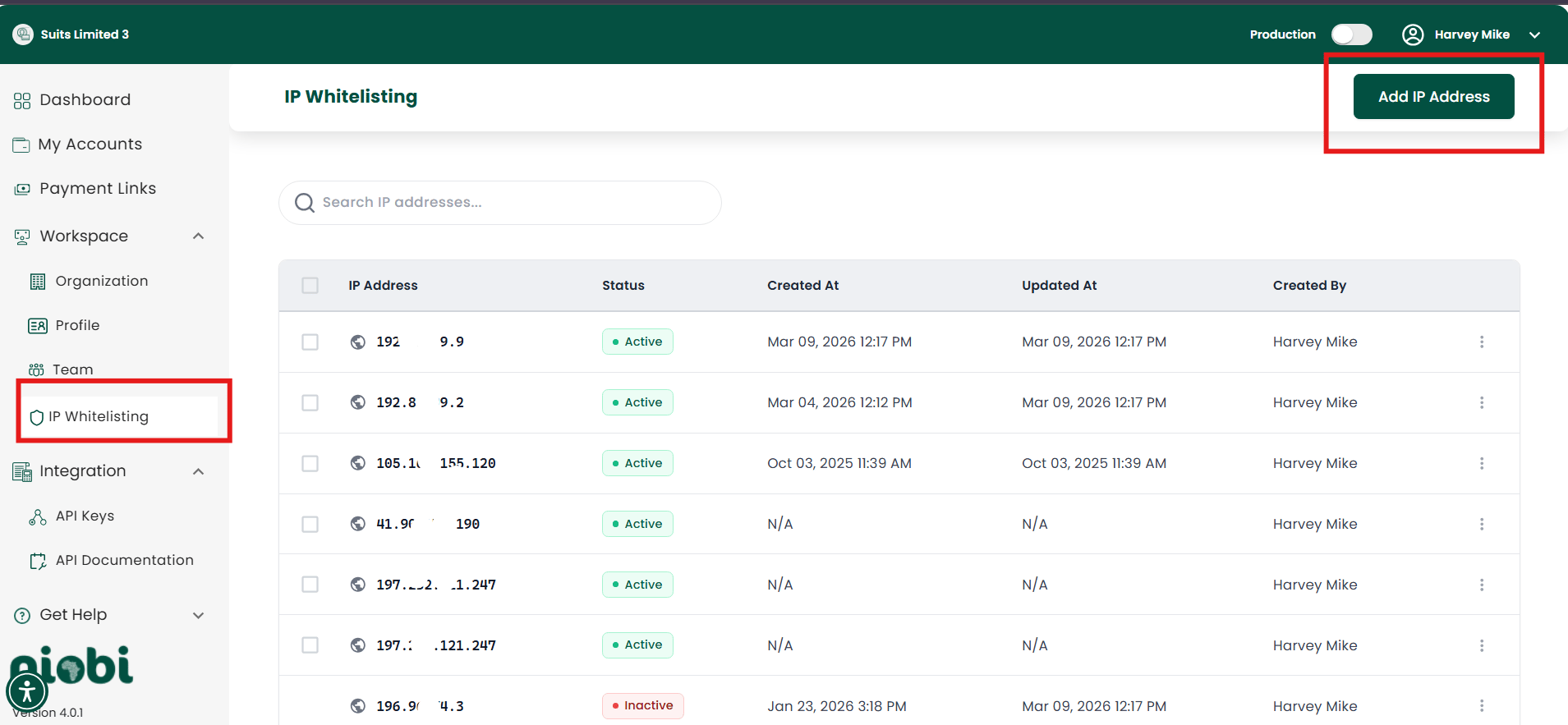 Using this portal workflow avoids manual email requests and lets you maintain security in real time.
***
## How to Check Your Public IP
Here are quick ways to find your public IP:
1. Through the terminal — run `curl ifconfig.me`
2. Through online sites like [whatismyip.com](https://www.whatismyip.com) or [ipinfo.io](https://ipinfo.io)
### Dynamic IP? Here's What to Do
If your server has a dynamic IP (i.e. it changes), we recommend switching to a static IP to avoid disruptions.
## Webhook Notifications - IP to Whitelist
If you're integrating webhook notifications, make sure to whitelist our IP address to receive updates. Kindly send an email to [support@niobi.co](mailto:support@niobi.co) to get access to the necessary IPs for whitelisting.
***
## How to Request Whitelisting
As an alternative to the portal whitelisting in case of any queries, you can request IP whitelisting by contacting us via:
* **Email**: [support@niobi.co](mailto:support@niobi.co)
* **Support Chat**: Available through our current support channels either on Slack, Whatsapp, Telegram
Environment: Sandbox / Live
Company Name: Your Company Name
IP Address(es): 102.XXX.XXX.XXX
Purpose: e.g., Testing or Production Deployment
Using this portal workflow avoids manual email requests and lets you maintain security in real time.
***
## How to Check Your Public IP
Here are quick ways to find your public IP:
1. Through the terminal — run `curl ifconfig.me`
2. Through online sites like [whatismyip.com](https://www.whatismyip.com) or [ipinfo.io](https://ipinfo.io)
### Dynamic IP? Here's What to Do
If your server has a dynamic IP (i.e. it changes), we recommend switching to a static IP to avoid disruptions.
## Webhook Notifications - IP to Whitelist
If you're integrating webhook notifications, make sure to whitelist our IP address to receive updates. Kindly send an email to [support@niobi.co](mailto:support@niobi.co) to get access to the necessary IPs for whitelisting.
***
## How to Request Whitelisting
As an alternative to the portal whitelisting in case of any queries, you can request IP whitelisting by contacting us via:
* **Email**: [support@niobi.co](mailto:support@niobi.co)
* **Support Chat**: Available through our current support channels either on Slack, Whatsapp, Telegram
Environment: Sandbox / Live
Company Name: Your Company Name
IP Address(es): 102.XXX.XXX.XXX
Purpose: e.g., Testing or Production Deployment